
1. The Regulatory Landscape and Compliance Imperatives
Operating an Enterprise Resource Planning (ERP) platform within a GxP-regulated life sciences organization carries exceptionally high stakes, as any error in a batch record or quality process can directly compromise patient safety and product quality. Consequently, global regulatory bodies enforce strict guidelines to govern computerized systems used in pharmaceutical manufacturing, clinical trials, and distribution. The foundation of these requirements resides in United States Food and Drug Administration (FDA) regulations, specifically 21 CFR Parts 210 and 211 for finished pharmaceuticals, and Part 820 for medical devices, alongside international standards like DIN EN ISO 13485 and European Union Good Manufacturing Practice (EU GMP) Volume 4.
To control the digital records supporting these processes, FDA 21 CFR Part 11 and EU GMP Annex 11 dictate that computerized systems maintain secure, immutable electronic records and signatures. Notably, FDA 21 CFR 11.10(e) explicitly requires secure, computer-generated, time-stamped audit trails to independently record the date and time of operator entries and actions that create, modify, or delete electronic records. While the FDA’s current guidance narrow-interprets the scope of Part 11—exercising enforcement discretion regarding validation, audit trail, record retention, and record copying—the underlying predicate rules governing manufacturing, batch documentation, and product safety remain fully enforceable. Regulated firms must prove that their systems are fit for their intended use and capable of generating accurate, retrievable records throughout a product’s lifecycle.
To satisfy these expectations, system access must be individually tracked, completely eliminating shared or generic logins. Each audit trail entry must capture the unique user identity, the exact action performed, a contemporaneous timestamp synchronized to a validated time source via Network Time Protocol (NTP) to prevent user-driven clock alterations, and a documented justification for any change made to critical parameters. Furthermore, electronic signatures must be permanently linked to their respective records, displaying the printed name of the signer, the date and time of execution, and the formal meaning of the signature. When an individual executes a series of signings during a single, continuous controlled access session, regulations permit executing subsequent signatures using a single security component (such as a password), provided the initial sign-off utilized all authentication components.
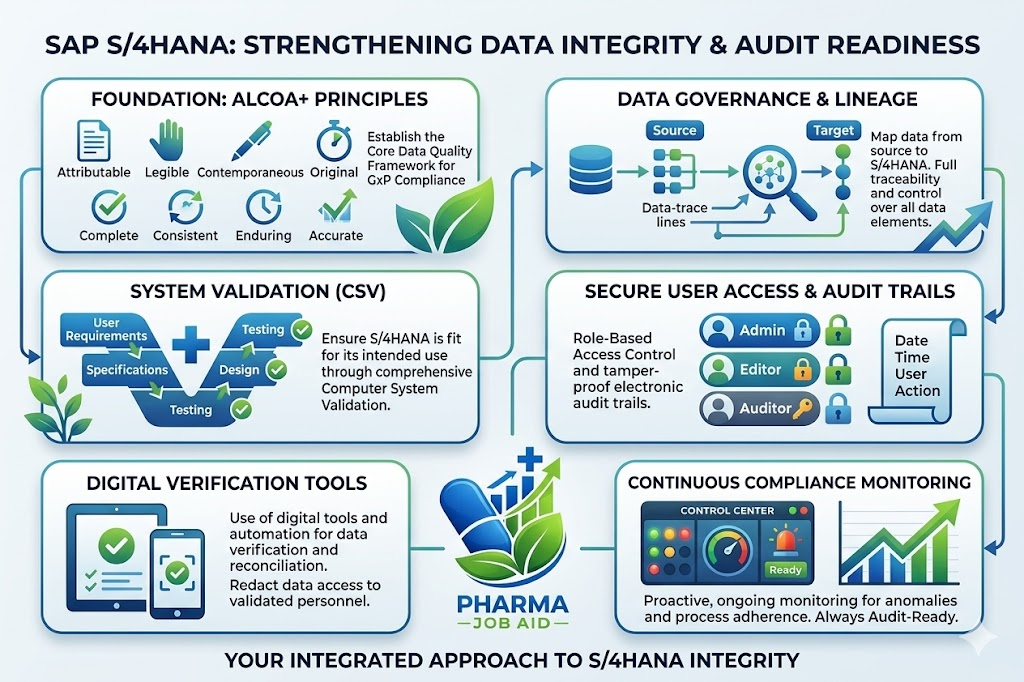
The regulatory burden of proving these controls function properly in the live environment remains entirely with the regulated firm, rather than the software vendor. Common compliance pitfalls include enabling audit trails in only a subset of application modules, failing to define a routine review cadence for generated logs, and running “shadow” spreadsheets outside formal change controls.
| Audit Trail Category | Compliance Purpose | Target Data Elements and System Activities |
|---|---|---|
| Configuration and Parameter Logs | Verifies system validation consistency and supports technical change control. | Modifications to application settings, system configurations, and operational parameters. |
| System and Operational Logs | Detects anomalous system activities, security breaches, and unauthorized access attempts. | User login and logout actions, failed access events, session durations, system startups, and shutdowns. |
| Electronic Signature Logs | Establishes chronological traceability and non-repudiation of approvals. | Cryptographic signature execution, authorized signer identity, approval meaning, and linked record metadata. |
2. Computer System Validation (CSV) vs. Computer Software Assurance (CSA)
In GxP-regulated environments, software validation is historically executed according to the GAMP 5 industry standard. Under GAMP 5, validation strategies are determined by software classifications, which align validation rigor to system complexity. Standard, unmodified commercial software is categorized as Category 1 (operating systems) or Category 3 (standard configurable products), which carry the lowest validation risk.
However, enterprise systems like SAP S/4HANA are typically configured to meet complex business processes. This places them under Category 4 (configured software), requiring validation of configurations, user requirements, and functional specifications. Any custom code, bespoke integrations, or major custom modifications are classified as Category 5 (custom software), which carries the highest validation overhead and requires full testing (IQ/OQ/PQ).
Traditional Computer System Validation (CSV) has often been criticized for its heavy, document-centric validation approach, which prioritizes paper-based evidence, manual screenshots, and exhaustive testing over critical thinking. To streamline this process, modern validation methodologies are shifting toward the FDA’s Computer Software Assurance (CSA) model.
CSA introduces a risk-based approach that focuses validation and testing efforts on high-risk functions directly impacting patient safety, product quality (SISPQ), and data integrity. It leverages the software vendor’s own standard testing and documentation (GAMP Category 3/4) and utilizes unscripted, ad-hoc, or automated testing for low-to-medium risk configurations, significantly reducing the validation burden.
| GAMP 5 Software Class | Description and ERP Application Examples | Validation and Documentation Overhead |
|---|---|---|
| Category 1 | Infrastructure software, standard operating systems, and database engines. | Managed under general IT infrastructure qualification; lowest risk profile. |
| Category 2 – 3 | Unmodified commercial off-the-shelf (COTS) applications and standard SAP base modules. | Basic configuration checks; verification of vendor software development lifecycle (SDLC). |
| Category 4 | Configured software, industry templates, standard user roles, and custom business rules. | Functional testing of configurations; verification of GxP workflows and security roles. |
| Category 5 | Custom ABAP code, custom database modifications, and custom-built system interfaces. | High validation burden; exhaustive code inspections, unit testing, and full IQ/OQ/PQ. |
Transitioning away from manual, spreadsheet-based validation tracking requires digital systems designed to manage the compliance lifecycle. Specialized digital frameworks—such as DHC Consulting’s Digital Process Landscape (DPL) and the IT Compliance Framework—compress years of CSV experience into standardized compliance templates.
The IT Compliance Framework includes 23 setup and service processes, documented across 15 standard operating procedures (SOPs) and 30 templates, ensuring that cloud and on-premises systems comply with GAMP 5 and operational GxP guidelines.
Furthermore, tools like the DHC Smart Validation Accelerator (SVA) integrate validation directly into SAP Cloud ALM. By linking user requirements, risk analyses, and test execution details in a digital platform, SVA eliminates the manual effort of maintaining traceability matrices.
Its automated Validation Change Analyzer detects system updates and identifies affected configurations, automating change impact analysis and allowing organizations to maintain continuous validation through targeted regression testing.
To manage resource constraints during major S/4HANA migrations, companies frequently utilize Managed Validation Services (Validation as a Service – VaaS). This modular model allows firms to outsource operational validation tasks—such as testing execution, change management, and supplier qualification—to external experts, while keeping internal Quality Assurance (QA) in the steering role.
3. S/4HANA Architecture, Deployment Models, and Cloud Compliance Risks
The architectural foundation of SAP S/4HANA relies on the in-memory database SAP HANA, which processes datasets directly in working memory. This design simplifies data models and enables fast, real-time analytics, making KPIs for maintenance, asset availability, and quality immediately accessible.
However, this transition is not merely a technical upgrade; it is an organizational transformation forced by legacy lifecycle deadlines. Because mainstream support for legacy SAP ECC systems is scheduled to end in 2027—and security updates, patches, and technical support will terminate entirely after 2030—migrating to S/4HANA is critical to protect business continuity, system security, and GxP compliance.
Organizations migrating to S/4HANA must select an implementation path that balances technical complexity, cost, and process optimization :
| Migration Strategy | Technical Mechanism and Core Benefits | Associated GxP Risks and Validation Challenges |
|---|---|---|
| Greenfield Implementation | Complete new system installation; legacy customizations are abandoned for best practices. | High initial configuration effort; all business processes and GxP master data must be re-validated. |
| Brownfield Conversion | Direct technical upgrade of existing SAP ECC systems, retaining legacy settings and data. | Risk of migrating legacy technical debt, custom code errors, and unclean data. |
| Selective Data Transition | Hybrid model; consolidates selected high-value transaction and master data into a clean core. | High planning complexity; requires extensive data mapping and selective validation strategies. |
This Selective Data Transition model is illustrated by Pfizer’s global ERP transformation. Transitioning from seven separate legacy ERP systems to a single, global S/4HANA digital core, Pfizer partnered with IBM and SNP to execute a selective migration utilizing the SNP Bluefield approach.
The migration was completed over an 18-month timeline, with the physical database cutover executed in 43 hours. This selective transformation reduced Pfizer’s legacy database size from 75 TB to 5.5 TB (a 93% reduction), consolidated general ledgers by 73%, and improved global order-to-cash cycle times by 5%. The single global S/4HANA platform now supports approximately 50,000 active users across 130 countries and 37 manufacturing plants.
Similarly, the Heinzel Group executed a selective data transition in 2019 to modernize its ERP landscape, consolidating legacy environments while ensuring uninterrupted production operations during the cutover. In sub-industry operations, Bilthoven Biologicals (BBIO) deployed a validated SAP environment to manage biological manufacturing , while blood bank operator Sanquin Plasma implemented SAP Global Batch Traceability (GBT) to consolidate donor-to-patient tracking across its supply chain.
Deploying these systems introduces critical decisions regarding cloud hosting models. Organizations can choose between on-premises systems, private clouds (such as SAP S/4HANA Cloud for GxP, Private Edition), public SaaS clouds, or hybrid landscapes.
This hosting choice exposes a significant compliance paradox: while public cloud environments offer continuous innovation, scalability, and security patches, they also enforce mandatory update schedules. This constant update cycle places a continuous validation strain on life sciences firms, who must validate changes before updates are deployed to production.
To mitigate this risk, firms must adopt a “Clean Core” strategy, keeping standard SaaS code clean of custom modifications and utilizing the SAP Business Technology Platform (BTP) for industry-specific extensions. This isolates core GxP processes, allowing standard cloud updates to be deployed with minimal re-validation.
Additionally, cloud contracts must be carefully negotiated, as certain operational boundaries are non-negotiable for public companies and large-scale manufacturing operations. Critical contract negotiation terms and “walk-away” criteria include:
- Update Deferrals: If a cloud provider cannot guarantee update deferrals during critical manufacturing campaigns or ongoing clinical trials, the SaaS public cloud model is unviable, and the firm must remain on-premises or in a highly controlled private cloud.
- User License Classification: Organizations must analyze active SAP transaction logs over the past 12 months to verify actual user patterns (e.g., distinguishing simple inventory views from direct batch modifications). Reclassifying named user types based on actual usage rather than assumed roles prevents expensive licensing audits.
- Indirect Access and CTMS Integrations: Often, external systems like Clinical Trial Management Systems (CTMS) programmatically connect to SAP, which can trigger additional license fees for CTMS users (such as trial coordinators and data managers) who never directly log into SAP. Organizations must model these costs against alternative ERP platforms (such as Oracle or NetSuite) to maintain leverage and negotiate cap limits on licensing liability.
4. Technical Configuration of S/4HANA for GxP Integrity
Enforcing data integrity and regulatory compliance within S/4HANA requires deep technical configurations at the database, application, and interface layers.
Digital Signature (CA-DSG) Configuration
The S/4HANA digital signature framework (CA-DSG) functions as a standardized programming interface embedded across manufacturing, maintenance, and quality modules. Configured via Secure Store and Forward (SSF) mechanisms and public-key cryptography, CA-DSG supports both System Signatures (authenticated directly against the SAP user master record) and User Signatures (utilizing public-key tokens, smart cards, and Secure Network Communications – SNC).
To secure these workflows, S/4HANA integrates Time-Based One-Time Passcodes (TOTP) and LDAP-driven password checks for credential verification. Timezone synchronization is also critical; global system timezones must be locked to secure NTP time sources, preventing local system clocks from being altered.
Executed signatures are recorded in the database, where they can be monitored using transaction DS_ENH_SIGN_PROC_MON or evaluated via DSLOG. Signatures must be systematically archived using the archiving object DS_ARCH in transaction SARA, which captures the signature header, transactional signature data, the signed document, and metadata.
  SARA Archiving Workflow
  +---------------------------------------------------------------+
  | Archiving Object: DS_ARCH                                     |
  | -> Identifies signature IDs and strategy types                |
  | -> Flags data for archive via IF_DS_RUNTIME~MARK_FOR_ARCHIVE  |
  | -> Deletes archived records from physical production database |
  +---------------------------------------------------------------+
Database Performance, Logging, and Warm Tiering (NSE)
S/4HANA tracks database modifications by writing change documents to two primary tables: CDHDR (storing change headers like date, time, and user ID) and CDPOS (storing the exact value changes, including table and field-level old and new values).
In highly active pharmaceutical plants, these tables—along with log tables like BALDAT (application logs), EDID4 (IDoc data), DBTABLOG (direct table changes), and ZARIX* (archiving indexes)—consume massive in-memory database capacity.
To manage database growth without compromising data access, organizations implement SAP HANA Native Storage Extension (NSE). NSE is a warm-data tiering technology that page-loads warm data segments from disk into buffer cache memory only when queried, rather than loading entire tables into expensive in-memory columns.
  In-Memory Storage vs. Native Storage Extension (NSE)


  +---------------------------------------------------------+
  | RAM: CDHDR & CDPOS Loaded Completely in memory (100%)   |
  +---------------------------------------------------------+


  +---------------------------------------------------------+
  | RAM (Active Columns Only): CDHDR (Header Fields)        |
  +---------------------------------------------------------+
  | Disk (Paged-Load via Buffer Cache): CDPOS Data Values   |
  +---------------------------------------------------------+
Using the HANA NSE Advisor, tables are designated as “page-preferred” or “page-enforced” load units. To verify database load unit settings, administrators run the report DD_REPAIR_TABT_DBPROPERTIES with the “check only” option, which identifies tables whose active database load unit differs from their ABAP Data Dictionary (DDIC) properties.
While NSE Advisor recommends offloading change tables to disk, compliance queries require careful optimization :
CDHDR: Must be configured back to “column-loadable” (in-memory) to maintain acceptable search performance for frequent header queries.CDPOS: Only secondary key columns—specificallyOBJECTIDandCHANGENR—should remain column-loadable in memory, while the rest of the table is warm-tiered.
Configuring NSE requires setting parameters in the HANA database configuration profile (global.ini) to manage the Buffer Cache. The parameter max_size_rel defines the upper limit of the buffer cache (typically set to 10% of total system RAM), while unload_threshold is configured to 80% to trigger automatic page flushes. These settings are applied in the global.ini profile under the buffer_cache_cs section:
Ini, TOML
[global.ini]
[buffer_cache_cs]
max_size_rel = 10
unload_threshold = 80
To write these parameters dynamically inside the SYSTEMDB, administrators execute the following SQL commands :
SQL
ALTER SYSTEM ALTER CONFIGURATION ('global.ini','SYSTEM') SET ('buffer_cache_cs','max_size_rel') = '10' WITH RECONFIGURE;
ALTER SYSTEM ALTER CONFIGURATION ('global.ini','SYSTEM') SET ('buffer_cache_cs','unload_threshold') = '80' WITH RECONFIGURE;
Once parameters are defined, specific tables, indexes, or individual partitions are configured as page-loadable :
SQL
ALTER TABLE CDPOS PAGE LOADABLE;
Security Audit Log (SAL) and Read Access Logging (RAL)
While database change logs track record modifications, administrative actions and security-related events are captured by the Security Audit Log (SAL). SAL tracks security configurations, administrative privilege changes, and failed login attempts.
Configured via transaction RSAU_CONFIG (or legacy SM19), modern SAL configurations write logs directly to the SAP database instead of flat files on the application server. This enables real-time integration with SIEM (Security Information and Event Management) platforms, such as SAP Enterprise Threat Detection, Onapsis, or SecurityBridge, to monitor and detect security incidents.
Read Access Logging (RAL) is a separate security tool configured to monitor and track when sensitive data is viewed, such as clinical trial patient records, employee personal details, or protected drug recipes.
RAL tracks exactly who accessed the records, at what time, and via which transaction or API, providing detailed auditing for intellectual property and data privacy compliance.
Post-Copy Adjustments and Search Setup
Following database migrations, system copies, or test-client refreshes, search connectors and index configurations must be technically re-validated. Under client 000, administrators launch transaction STC01 and execute the task list SAP_ESH_ADJUST_AFTER_COPY to synchronize search parameters.
If search components are corrupted, the task list SAP_ESH_RESET is run to restore default search configurations. Key post-copy adjustment programs include:
ESH_ADM_SET_TREX_DESTINATION: Configures search connectors to use the default HANA primary database connection, eliminating the need for secondary database setups.ESH_REFRESH_RUNTIME_BUFFER: Resets the TREX runtime buffer to resolve indexing sync errors.ESH_RECREATE_ALL_JOIN_INDICES: Recreates join index tables in instances of indexing corruption.ESH_SET_INDEXING_PACKAGESIZE: Controls index package sizing to prevent system memory allocation dumps (such asSYSTEM_NO_ROLLorTSV_TNEW_PAGE_ALLOC_FAILED).ESH_EX_SET_EXTRACTION_USER: Establishes the extraction user ID used for real-time background indexing.
5. Industry-Specific Capabilities: Quality, Traceability, and Serialization
Integrating GxP-compliant workflows directly into S/4HANA core business transactions allows life sciences firms to run end-to-end operations on a single, validated system.
Preconfigured Industry Templates
To reduce validation timelines, organizations utilize industry templates such as NTT DATA’s it.lifesciences. This template includes over 1,500 preconfigured GxP user requirements and covers 300 industry-specific processes.
It supports sub-industry compliance, including active pharmaceutical ingredients (API) processing, biotechnology, cosmetics, blood plasma derived medicines (it.lifesciences for plasma), medical devices (Unique Device Identification – UDI), and over-the-counter (OTC) processing.
NextGen Quality Integration
Major ERP transformation initiatives, such as the Transcend SAP S/4HANA Program, specialize in consolidating fragmented IT landscapes.
For example, the Transcend program standardizes operations by simplifying seven legacy systems into a single S/4HANA core. It integrates SAP Quality Management (QM) with NextGen Quality Systems (QS) to automate non-conformance management and in-process product inspections.
It also supports future integrations with Batch Record Hub (BRH) and Global Batch Traceability (GBT) to enable real-time batch release and disposition.
Drug Serialization with SAP ATTP
To meet global drug track-and-trace laws, such as the US Drug Supply Chain Security Act (DSCSA) and the EU Falsified Medicines Directive (EU FMD), S/4HANA integrates with SAP Advanced Track and Trace for Pharmaceuticals (ATTP). ATTP acts as a secure, high-volume serial number repository that manages randomized serial numbers and generates compliance reports.
  ATTP Integration Topology
  +-----------------------------------------------------------+
  | S/4HANA (Master Data, Batches, Logistics)                 |
  +-----------------------------------------------------------+
           |
           v
  +-----------------------------------------------------------+
  | SAP ATTP (Serial Number Management & Rules Engine)        |
  +-----------------------------------------------------------+
       |                  |                  |                  |
       v                  v                  v                  v
                             [Govt. Hubs]
  Packaging Lines    Warehouse Scans    Partner Exchange   Country XMLs
Implementing ATTP requires configuring integrations across the system landscape to maintain data integrity :
| System Component | Integration Role and Compliance Value | Technical Deliverables and Handshakes |
|---|---|---|
| S/4HANA Core ERP | Synchronizes serialization with master and transaction records. | Aligns batch data, expiration dates, and product codes to avoid mismatches. |
| SAP EWM | Integrates serialization with warehouse logistics. | Tracks receiving, shipping, and pallet aggregation/disaggregation. |
| SAP MII | Connects ATTP to shop-floor packaging systems. | Sends randomized serial numbers to packaging lines and captures printed results. |
| SAP BTP | Provides a secure layer to exchange serialization data. | Automates workflows and B2B exchanges without custom core modifications. |
| Regulatory Hubs | Automates direct reporting to government authorities. | Formats XML messages to meet country-specific track-and-trace rules. |
6. Migration Governance, Data Quality, and Decommissioning
A successful migration to S/4HANA requires high standards of data quality, as migrating inconsistent, redundant, or incomplete legacy data will compromise the automated workflows and analytics of the new system.
To manage this risk, organizations utilize specialized data suites, such as PwC’s Data Quality & Migration Suite (DQMS).
DQMS provides over 100 master data design templates, 2,000 embedded data quality rules, and automated dashboards to track data health throughout the migration lifecycle.
The suite also leverages generative AI to automatically generate source-to-target field mappings and provides a dataset comparator to analyze database schemas across keys and descriptions, helping organizations prepare up to 30% more data for validation per test cycle.
  Clean Core Migration Framework
  +-------------------------------+
  | Legacy ECC Database (75 TB)   |
  +-------------------------------+
                 |
                 +--->
                 |     Standardizes formats, runs 2,000+ data quality rules
                 |
                 +--->
                 |     Executes mock loads, achieves 95% pre-load accuracy
                 |
                 +--->
                 |     Maps maintenance history & bills of materials
                 |
                 +--->
                 |     Decommissions legacy server, archives cold data
                 |
                 v
  +-------------------------------+
  | S/4HANA Columnar Core (5.5 TB)|
  +-------------------------------+
For automated database reconciliation, organizations deploy validation platforms like DataVapte. In a real-world pharmaceutical migration case study, DataVapte’s automated validation cleared inconsistent data across legacy databases, achieving a 95% data accuracy rate before final migration cutover, reducing manual cleansing times by 40%, and maintaining regulatory compliance.
Additionally, managing asset maintenance data requires modern CMMS tools like the osapiens HUB for Maintenance. Integrations like osapiens EAM synchronize maintenance logs, nested asset structures, bills of materials, customized task lists, and spare parts management, preventing errors during maintenance data migration.
Finally, completing the S/4HANA migration allows organizations to decommission legacy SAP ECC systems to reduce licensing and infrastructure costs.
However, regulatory guidelines require companies to maintain access to historical GxP records.
To address this, organizations utilize active archiving tools like SNP Datafridge. SNP Datafridge secure-stores legacy database files, allowing compliance teams to access, search, and retrieve legacy GxP records for audits without the high licensing and physical server costs of running the old ECC system.
7. Strategic Conclusions and Actionable Recommendations
Transitioning to SAP S/4HANA is a complex, high-stakes transformation that requires careful planning across technology, validation, and business processes. To successfully navigate this migration while maintaining strict regulatory compliance and audit readiness, organizations should adopt the following strategic approaches:
Align Validation with Risk-Based Computer Software Assurance (CSA)
Organizations should transition their validation framework from documentation-heavy CSV to risk-based CSA.
By focusing testing on high-risk GxP workflows (such as custom integrations, batch release gates, and serialization reporting), firms can reduce the time spent documenting low-risk standard features.
Validation teams should utilize automated validation tools integrated with SAP Cloud ALM to automate change impact analysis, establish traceability matrices, and maintain a continuous state of validation across system updates.
Adopt a Clean-Core Architecture on SAP BTP
To insulate validated systems from mandatory cloud updates, organizations should enforce a strict “Clean Core” strategy. Core ERP databases must remain standard.
Any industry-specific or custom applications must be built as modular extensions on the SAP Business Technology Platform (BTP).
This ensures that standard cloud updates can be deployed without causing compliance issues or requiring expensive, full-system re-validation.
Implement Strategic Data Cleansing and Active Decommissioning
Organizations must execute rigorous data profiling and cleansing before attempting data migration.
Using automated profiling suites and CMMS connectors, firms should standardize formats, resolve inconsistencies, and reconcile database schemas.
Furthermore, organizations should utilize active archiving platforms like SNP Datafridge to secure legacy database histories, allowing legacy SAP ECC systems to be decommissioned while maintaining audit-ready access to historical GxP records.
Enforce Database performance and Audit Configurations
To prevent system lag, S/4HANA’s massive change document tables (CDHDR and CDPOS) must be configured with Native Storage Extension (NSE) warm-tiering.
Administrators should keep key index columns in high-performance memory while warm-tiering values to disk, configuring the buffer cache and unload thresholds appropriately.
Additionally, Security Audit Logs must write entries directly to high-performance database tables rather than flat files, enabling integration with SIEM tools to monitor and detect unauthorized activities.
- intuitionlabs.ai SAP S/4HANA Pharma: GxP Implementation & Validation – IntuitionLabs Opens in a new window
- intuitionlabs.ai
- SAP S/4HANA Pharma: GxP Implementation & Validation | IntuitionLabs
- Opens in a new window
- saplicensingexperts.com
- SAP Licensing for Pharma & Life Sciences: GxP Validation, Compliance and Licence Risk
- Opens in a new window
- gambit-group.com
- What is SAP GxP? | Solution for regulated industries – Gambit-Group
- Opens in a new window
- dhc-consulting.com
- Software Validation & CSV | GxP Compliance in Life Sciences – DHC Consulting
- Opens in a new window
- fda.gov
- Guidance for Industry – Part 11, Electronic Records; Electronic Signatures — Scope and Application – FDA
- Opens in a new window
- evo-byte.com
- 21 CFR Part 11 Made Simple: Audit Trails and E‑Signatures in LIMS and ELN
- Opens in a new window
- simplerqms.com
- FDA 21 CFR Part 11 Audit Trails: Definition, Requirements, and Compliance – SimplerQMS
- Opens in a new window
- qt9software.com
- Guide to FDA 21 CFR Part 11: Electronic Records, e-Signatures and Audit-Ready Compliance – QT9 Software
- Opens in a new window
- arbourgroup.com
- Electronic Signatures and 21 CFR Part 11 – Arbour Group
- Opens in a new window
- creoinc.applytojob.com
- Consultant (CSV SAP S/4HANA) – CREO – Career Page
- Opens in a new window
- clarkstonconsulting.com
- Leveraging CSA Principles for AI Validation – Clarkston Consulting
- Opens in a new window
- pharmaconnections.in
- What Every Pharma Professional Must Know About SAP S/4HANA Migration and CSV Compliance
- Opens in a new window
- dhc-consulting.com
- SAP S/4HANA Validation | GxP-Compliant CSV for Life Sciences
- Opens in a new window
- rephine.com
- SAP S/4HANA validation – CSV for ERP Systems – Rephine
- Opens in a new window
- osapiens-cmms.com
- SAP S/4HANA Migration: Strategies & Best Practices – osapiens HUB for Maintenance
- Opens in a new window
- thescon.de
- Implementing SAP S/4HANA Safely in GxP Environments – THESCON GmbH
- Opens in a new window
- snpgroup.com
- S/4HANA Migration – SNP Group
- Opens in a new window
- intuitionlabs.ai
- SAP in the Pharmaceutical Industry: Enterprise Solutions for Drug …
- Opens in a new window
- bebee.com
- Transcend: Deploy Make QM Exp Analyst – Johnson & Johnson | BeBee
- Opens in a new window
- nttdata-solutions.com
- SAP Solutions for Life Science Organizations
- Opens in a new window
- help.sap.com
- Digital Signature (CA-DSG) – SAP Help Portal
- Opens in a new window
- help.sap.com
- Digital Signature (CA-DSG) – SAP Help Portal
- Opens in a new window
- help.sap.com
- Usage in SAP Applications (S/4 HANA)
- Opens in a new window
- cloud4c.com
- SAP Security Management: What Do You Need to Know – Cloud4C
- Opens in a new window
- help.sap.com
- Digital Signature (CA-DSG) – ABAP Platform – SAP Help Portal
- Opens in a new window
- help.sap.com
- Archiving Digital Signature (CA-DSG) – SAP Help Portal
- Opens in a new window
- saptechnicalguru.com
- HANA NSE (Native Storage Extension) – Saptechnicalguru.com – SAP technical guru’s
- Opens in a new window
- saptechnicalguru.com
- NSE – Saptechnicalguru.com
- Opens in a new window
- saptechnicalguru.com
- Data archiving – Saptechnicalguru.com – SAP technical guru’s
- Opens in a new window
- saptechnicalguru.com
- Database growth – Saptechnicalguru.com – SAP technical guru’s
- Opens in a new window
- aglea.com
- SAP Security Audit Log – Aglea
- Opens in a new window
- cloud4c.com
- SAP Security Auditing: Tools, Techniques, and Best Practices – Cloud4C
- Opens in a new window
- onapsis.com
- SOX Compliance in SAP: What It Is and How to Achieve It – Onapsis
- Opens in a new window
- saptechnicalguru.com
- Basis – Page 28 – Saptechnicalguru.com
- Opens in a new window
- tealhq.com
- Transcend: Deploy Make QM Exp Analyst – Johnson – Teal
- Opens in a new window
- tealhq.com
- Transcend: Deploy Make QM Exp Analyst @ Johnson & – Teal
- Opens in a new window
- leverx.com
- SAP Advanced Track and Trace (SAP ATTP) – LeverX
- Opens in a new window
- indx.com
- SAP ATTP, Pharmaceutical Serialization & Regulatory Compliance – IndX
- Opens in a new window
- nttdata-solutions.com
- SAP ATTP: Advance Track & Trace for Pharmaceuticals – NTT DATA Business Solutions
- Opens in a new window
- nttdata-solutions.com
- ERP Integration with SAP ATTP for Pharmaceuticals – NTT DATA Business Solutions
- Opens in a new window
- help.sap.com
- SAP Advanced Track and Trace for Pharmaceuticals
- Opens in a new window
- datavapte.com
- Ensuring SAP Data Accuracy S/4HANA Migrations – DataVapte
- Opens in a new window
- pwc.com
- SAP S/4HANA Data Quality and Migration Suite: PwC
- Opens in a new window
- prometheusgroup.com
- SAP Data Migration Best Practices – Prometheus Group
- Opens in a new window